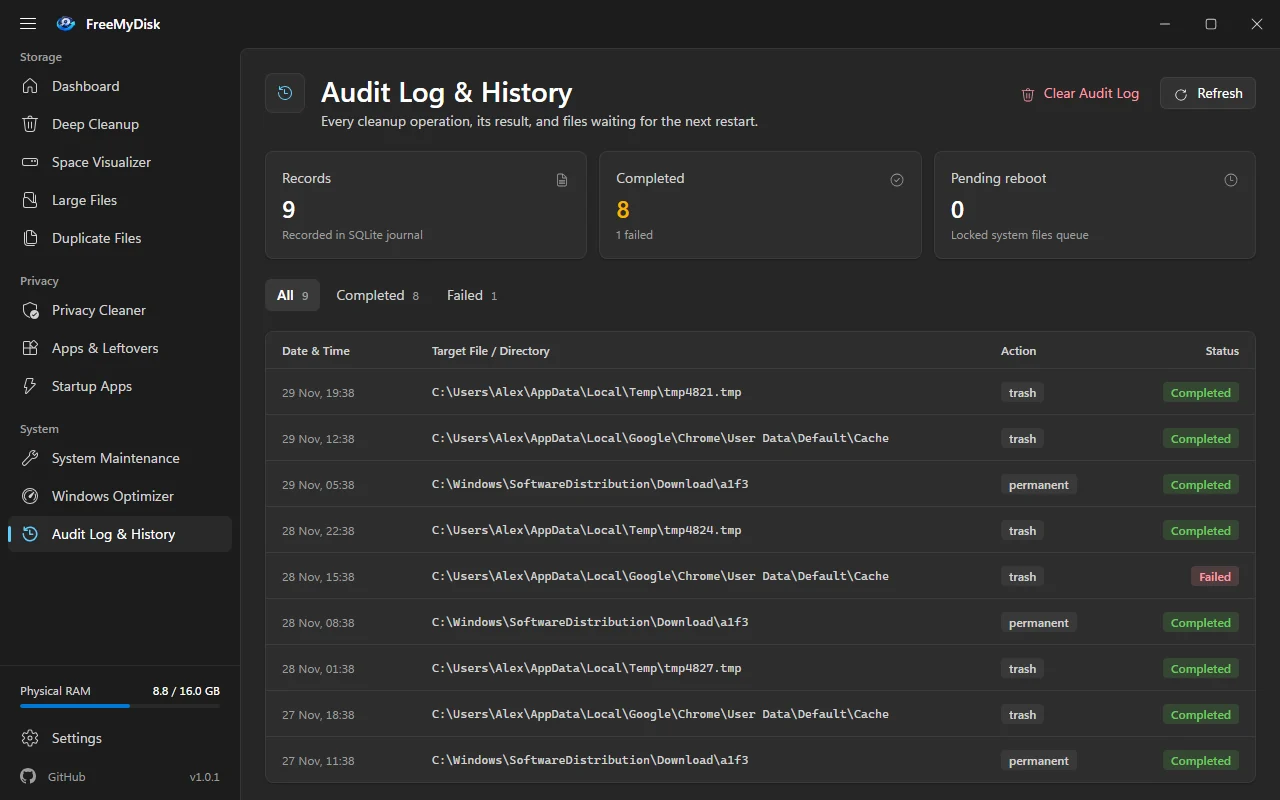
The Audit Log is a permanent record of every cleanup operation: which file or folder was removed, how, when, and whether it worked. It is also where you see files that Windows will remove at the next restart.
The records
The cards show the number of Records, how many Completed and failed, and how many files are Pending reboot.
Each record shows:
| Column | Meaning |
|---|---|
| Date & Time | When the step ran |
| Target File / Directory | The full path that was removed |
| Action | trash (moved to the Recycle Bin) or permanent (deleted) |
| Status | Completed or Failed, with the reason when it failed |
Filter with All, Completed and Failed. Refresh reloads the list.
Files removed at the next restart
Some files are locked by Windows itself and can’t be removed while it is running. FreeMyDisk asks Windows to remove them at the next restart, and lists them here with their sizes. You can cancel an entry before you restart.
Interrupted cleanups
Every step is written to the journal before it happens. If a cleanup is interrupted, for example by a power cut, a crash or closing the app, FreeMyDisk detects it on the next start and shows a banner with Review and restore. It tells you exactly which items were moved and which were not, so nothing is lost or left half-done.
Clearing the log
Clear Audit Log removes completed records. Records that still need your attention, such as an interrupted cleanup that needs a manual review, are kept.
Where the log is stored
The log is an SQLite database on your PC: %APPDATA%\app.freemydisk.desktop\journal.db. It never leaves your computer. See Privacy and Data.
Related
- Safety Model: how the journal makes every cleanup recoverable
- Troubleshooting